Midnight Node の構築
Partner-Chains-Node と同じサーバーに構築する手順を説明します
cardano-node の鍵を用意する
ディレクトリを作成
mkdir -p $HOME/midnight-node-docker/cardano-keys
鍵の転送
エアギャップマシンの node.skey と payment.vkey と payment.skey を midnight-node の cardano-keys ディレクトリにコピーします。
鍵ファイルの名称変更
Midnightのマニュアル通りに進めるため、node.skey を cold.skey に名称変更します。
mv $HOME/midnight-node-docker/cardano-keys/node.skey $HOME/midnight-node-docker/cardano-keys/cold.skey
環境変数の変更
.envrc ファイルを修正する(1/2)
ip -o -4 addr show scope global \
  | awk '{print $4}' | cut -d/ -f1 \
  | grep -vE '^(10\.|172\.(1[6-9]|2[0-9]|3[01])\.|192\.168\.|100\.(6[4-9]|[7-9][0-9]|1[01][0-9]|12[0-7])\.|169\.254\.|127\.)'
sed -i "/^export POSTGRES_HOST=/{ s/^/#/; aexport POSTGRES_HOST="0.0.0.0"
}" $HOME/midnight-node-docker/.envrc
.envrc ファイルを修正する(2/2)
midnight-nodeコンテナがバリデーターモードで起動するようにフラグを変更する。
sed -i '/^export APPEND_ARGS=/{ s/^/#/; a\
export APPEND_ARGS="--validator --allow-private-ip --pool-limit 10 --trie-cache-size 0 --prometheus-external --unsafe-rpc-external --rpc-methods=Unsafe --rpc-cors all --rpc-port 9944 --keystore-path=/data/chains/partner_chains_template/keystore/"
}' $HOME/midnight-node-docker/.envrc
ディレクトリを移動する
cd $HOME/midnight-node-docker
以下のエラーが表示されますが正常です!
direnv: error /home/cardano/midnight-node-docker/.envrc is blocked. Run `direnv allow` to approve its content
環境変数を反映する
direnv を許可し環境変数を反映します
direnv allow
PostgreSQL の接続文字列を確認する
後で使用しますので、戻り値をメモ帳などにコピーしておいてください
echo postgresql://${POSTGRES_USER}:${POSTGRES_PASSWORD}@${POSTGRES_IP}:${POSTGRES_PORT}/${POSTGRES_DB}
例)
postgresql://postgres:askljdlfkjasdjf@192.168.131.102:5432/cexplorer
Midnight-node の各種鍵生成の準備
midnight シェルの起動
midnight コンテナが起動します
$HOME/midnight-node-docker/midnight-shell.sh
midnight シェルから抜ける
cardano-keysディレクトリを midnight コンテナにコピーするため、一度コンテナから抜けます
exit
cardano-keys を midnight コンテナにコピーする
docker cp cardano-keys/ midnight:cardano-keys
Successfully copied 4.61kB to midnight:cardano-keys
midnight-node の各種鍵の生成
midnight シェルにログイン
midnight シェルにログインします
cd $HOME/midnight-node-docker
./midnight-shell.sh
鍵の生成
/midnight-node wizard generate-keys
? node base path (./data)

🔑 The following public keys were generated and saved to the partner-chains-public-keys.json file:
{
"sidechain_pub_key": "0x0394730e25efc3eb55db02c1862fbfe8f68fd76c2ca0a2dbd85878ca68526f21fc",
"aura_pub_key": "0x52eace6cc1dfd7c64c523c7d735d7165e83bc3a4f6e65048753f6061e4058d08",
"grandpa_pub_key": "0xb31475612dcd0342a684172b14f4899a57745f3fd1b7758aa6eab34013a466b4"
}
You may share them with your chain governance authority
if you wish to be included as a permissioned candidate.

⚙️ Generating network key
running external command: /midnight-node key generate-node-key --base-path ./data
command output: Generating key in "./data/chains/undeployed/network/secret_ed25519"
command output: 12D3KooWRLCiFd99Ts7VA8XBG2XxbV8izq6BgyRtD1G2gJtgcURA

🚀 All done!
生成した鍵を移動する
mv ./data/chains/undeployed ./data/chains/partner_chains_template
chain-spec.jsonを生成する
/midnight-node wizards create-chain-spec
Midnight Validator 登録
Validator 登録ウィザード (1/3)
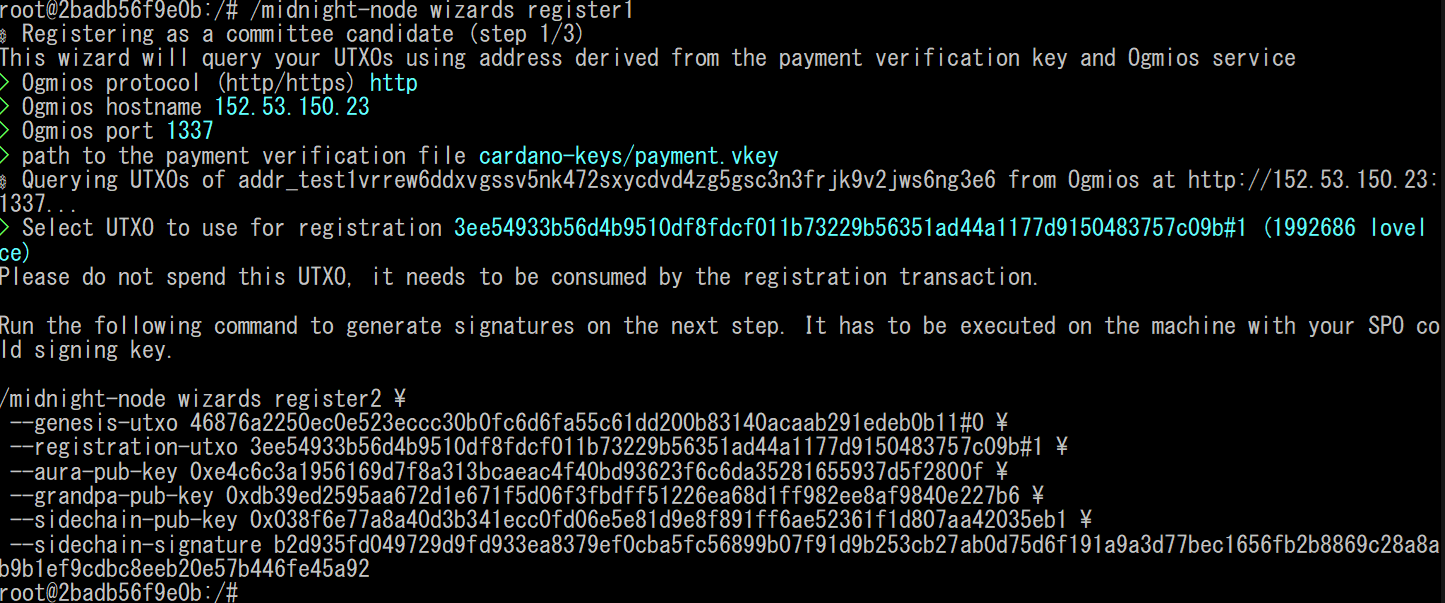
/midnight-node wizards register1
⚙️ Registering as a committee candidate (step 1/3) This wizard will query your UTXOs using address derived from the payment verification key and Ogmios service ? Ogmios protocol (http/https) http https [↑↓ to move, enter to select, type to filter]
http を選択する
? Ogmis hostname (localhost)
Partner Chains Node のグローバルIPアドレスを入力する
? Ogmis port (1337)
そのまま Enter を入力する
? path to the payment verification file (payment.vkey)
cardano-keys/payment.vkey を入力する
? Select an UTXO to use as the genesis UTXO:
適当なUTXOを選択する
以下のようなエラーの場合、1行目に表示されている addr_test1 から始まるアドレスに少額のtADAを送金することでUTXOが作成され、次に進めるようになります。
⚙️ Querying UTXOs of addr_test1vqr6945df00pdlcn8rjac6pkfc6elzgdd8qt6te2qmwactqkmweer from Ogmios at http://151.32.151.234:1337...
⚠️ No UTXOs found for the given address
The registering transaction requires at least one UTXO to be present at the address.
Error: Application(No UTXOs found

Stack backtrace:
0: anyhow::error::<impl anyhow::Error>::msg
1: <partner_chains_cli::register::register1::Register1Cmd as partner_chains_cli::CmdRun>::run
2: midnight_node::command::run
3: midnight_node::main
4: std::sys::backtrace::__rust_begin_short_backtrace
5: std::rt::lang_start::{{closure}}
6: core::ops::function::impls::<impl core::ops::function::FnOnce<A> for &F>::call_once
            at ./rustc/05f9846f893b09a1be1fc8560e33fc3c815cfecb/library/core/src/ops/function.rs:284:13
7: std::panicking::try::do_call
            at ./rustc/05f9846f893b09a1be1fc8560e33fc3c815cfecb/library/std/src/panicking.rs:587:40
8: std::panicking::try
            at ./rustc/05f9846f893b09a1be1fc8560e33fc3c815cfecb/library/std/src/panicking.rs:550:19
9: std::panic::catch_unwind
            at ./rustc/05f9846f893b09a1be1fc8560e33fc3c815cfecb/library/std/src/panic.rs:358:14
10: std::rt::lang_start_internal::{{closure}}
            at ./rustc/05f9846f893b09a1be1fc8560e33fc3c815cfecb/library/std/src/rt.rs:168:24
11: std::panicking::try::do_call
            at ./rustc/05f9846f893b09a1be1fc8560e33fc3c815cfecb/library/std/src/panicking.rs:587:40
12: std::panicking::try
            at ./rustc/05f9846f893b09a1be1fc8560e33fc3c815cfecb/library/std/src/panicking.rs:550:19
13: std::panic::catch_unwind
            at ./rustc/05f9846f893b09a1be1fc8560e33fc3c815cfecb/library/std/src/panic.rs:358:14
14: std::rt::lang_start_internal
            at ./rustc/05f9846f893b09a1be1fc8560e33fc3c815cfecb/library/std/src/rt.rs:164:5
15: main
16: __libc_start_call_main
            at ./csu/../sysdeps/nptl/libc_start_call_main.h:58:16
17: __libc_start_main_impl
            at ./csu/../csu/libc-start.c:360:3
18: _start)
Validator 登録ウィザード (2/3)